
Download Dependency Walker (64-Bit) – dependency checker, module analyzer, DLL analyzer, Windows tool, software diagnostic
Overview
Dependency Walker (64-Bit) is a specialized utility designed for developers and IT professionals working within Windows environments. Its primary purpose is to analyze executable files, DLLs, and other Windows modules by mapping out their complete dependency trees. This tool is particularly valuable when diagnosing issues related to missing, corrupted, or incompatible dependencies that can prevent applications from launching or functioning correctly. By providing a visual and detailed breakdown of how modules interact, it helps users identify root causes of software failures, such as unresolved imports or mismatched architecture types.
The app targets software developers, system administrators, and technical support personnel who require precise insights into module behavior during runtime or installation. It is especially useful in scenarios involving legacy software migration, debugging third-party library integration, or validating the integrity of compiled binaries. While the developer, Pei Hua Software, is listed, no additional background or history about the company was provided. The tool has been available since 2012, indicating long-term use in professional workflows despite its age.
Within the broader software development ecosystem, Dependency Walker (64-Bit) fills a niche role as a diagnostic utility for low-level Windows module analysis. Its ability to handle both 32-bit and 64-bit modules makes it adaptable to mixed environments. Although newer tools have emerged, its continued relevance underscores its reliability in core debugging tasks. For those needing a straightforward, no-frills solution to dependency inspection, this app remains a practical choice.
Key Features & Functionality
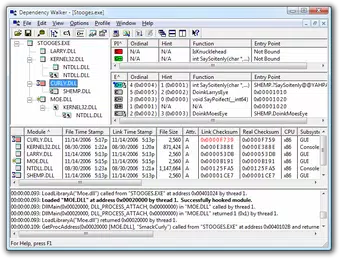
- Hierarchical Dependency Display: The application generates a tree-like diagram that organizes all dependent modules linked to a selected file. This visual hierarchy allows users to trace the chain of dependencies from top-level executables down to individual DLLs, simplifying complex dependency structures.
- Detailed Module Information: For each module, Dependency Walker provides extensive metadata such as file paths, version numbers, machine type (x86 or x64), and debug information. This level of detail supports thorough analysis during troubleshooting and validation processes.
- Error Detection Capabilities: The tool actively identifies common issues including missing DLLs, invalid imports, circular dependencies, and mismatched function signatures. These alerts help users pinpoint the exact source of module loading failures.
- Support for Multiple Architectures: Whether analyzing 32-bit or 64-bit modules, the tool operates consistently across both platforms. This dual support ensures compatibility with modern Windows systems where both architectures may coexist.
- Efficient Troubleshooting Assistance: By isolating problematic dependencies quickly, the tool reduces debugging time significantly. This efficiency is critical in production environments where application downtime must be minimized.
For example, a developer encountering a "The application failed to start" error can use Dependency Walker to open the executable and immediately see which DLL is missing or improperly linked. Similarly, an IT administrator verifying a software package before deployment can use the tool to ensure all required modules are present and correctly referenced.
Interface, UX & Performance
The user interface of Dependency Walker (64-Bit) is functional and focused on utility rather than aesthetics. It presents a two-pane layout: one for the dependency tree and another for module details. Navigation is straightforward, relying on standard file selection and tree expansion/collapse mechanisms. Users can double-click any module to view its exported functions and imported symbols, enabling granular inspection.
Although the developer did not list formal performance metrics, the tool operates efficiently on modern Windows systems, loading and analyzing modules in a timely manner. Its lightweight nature—only 1.1 MB in size—contributes to fast startup times and minimal resource consumption. The application remains responsive during analysis, even with complex dependency chains.
Stability appears to be consistent, given its long-standing presence in developer toolkits. However, compatibility with newer Windows versions may vary, as the tool was last updated in 2012. No official support for newer OS features or security models was mentioned. Nonetheless, for basic dependency scanning tasks, the interface remains usable and effective.
Platform Compatibility & Technical Requirements
Dependency Walker (64-Bit) is designed for the Windows platform and supports both 32-bit and 64-bit Windows modules. The software version is 2.1, and the file size is 1.1 MB. It is available at no cost, making it accessible to a wide range of users.
The developer did not specify minimum OS requirements or compatibility details beyond the platform. Therefore, it is unclear whether the tool functions on Windows 10, Windows 11, or earlier versions such as Windows 7. Users should exercise caution when deploying it on newer systems, as legacy tools may encounter compatibility issues due to changes in system security, driver signing policies, or API deprecations.
Although no specific hardware or system configuration was listed, the small file size suggests minimal hardware demands. The application runs without requiring installation, functioning as a portable executable. This makes it easy to deploy across multiple machines or use in isolated environments.
Pros and Cons
Pros
- Free to download and use, with no licensing restrictions.
- Lightweight at only 1.1 MB, ensuring fast loading and low system impact.
- Supports both 32-bit and 64-bit module analysis, offering broad compatibility.
- Provides detailed dependency visualization and metadata for in-depth troubleshooting.
- Portable format allows use without installation or admin rights.
Cons
- Latest update was in 2012, raising concerns about long-term support and modern OS compatibility.
- No official documentation or user guides were provided in the available data.
- Interface is outdated and lacks modern UX design elements.
- May not function properly on newer Windows versions due to security and API changes.
- Does not support newer file formats or advanced diagnostic features found in modern tools.
FAQ
Is Dependency Walker (64-Bit) safe to download and use?
Yes, the tool is free and widely used in developer communities. However, as with any legacy software, users should scan the file with antivirus software before running it, especially on production systems.
Can I use Dependency Walker on Windows 10 or Windows 11?
While the tool was released in 2012, it may work on Windows 10 and 11. However, compatibility is not guaranteed due to changes in system security and module loading policies. Testing in a controlled environment is recommended.
Does Dependency Walker require installation?
No, it is a portable application. You can run it directly from a folder or USB drive without installing it on the system.
Is there a mobile version of Dependency Walker (64-Bit)?
No, the tool is designed exclusively for Windows desktop environments. There is no mobile or cross-platform version available.
How do I update Dependency Walker (64-Bit)?
As of now, no official updates are available. The latest version remains 2.1, released in 2012. Users should monitor the official source for any future releases.
Final Thoughts
Dependency Walker (64-Bit) remains a reliable utility for developers and IT professionals who need to analyze module dependencies on Windows systems. Despite its age and lack of modern features, its core functionality—visualizing dependency trees and identifying missing or broken links—remains highly effective for basic diagnostics. Its portability, low resource usage, and zero cost make it a practical tool for quick checks and troubleshooting sessions.
While newer alternatives may offer enhanced security, better UIs, and improved compatibility with modern Windows versions, Dependency Walker continues to serve as a lightweight, no-frills solution for those working with legacy or low-level software. It is especially valuable in environments where simplicity and speed are prioritized over advanced analytics.
For developers and system administrators seeking a dependable, free tool to inspect DLLs and executables, Dependency Walker (64-Bit) delivers consistent value. Download it now to streamline your module diagnostics and improve software reliability.
Download Dependency Walker (64-Bit) now


